A large private house or villa on Phuket is not a single flat — it is several floors, a technical room, a pool area, a pavilion and a garden. A single router next to the TV set in the living room only covers a couple of adjacent rooms. Everywhere else you get weak signal, interrupted video calls and frustrated children complaining that Netflix is buffering again.
At WLTT we run dozens of projects like this every year, and we follow a transparent methodology: site survey → planning → design → installation → commissioning → support.
What we actually do
- RF site survey at your property.
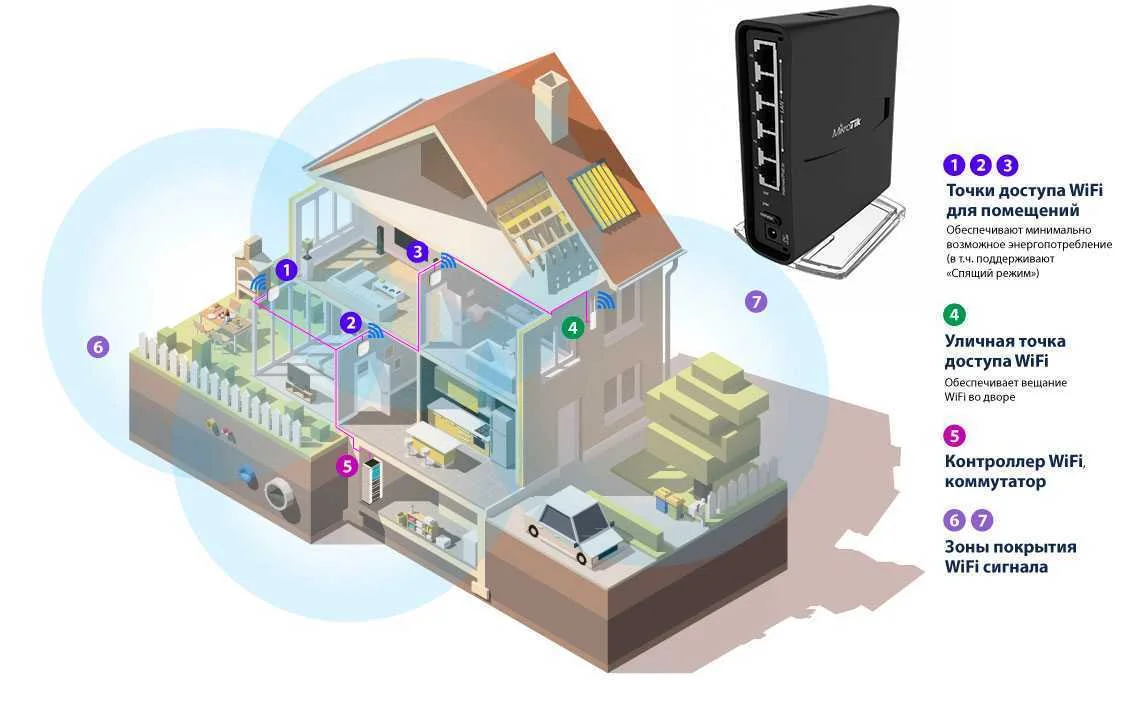
- Coverage map and access point placement plan.
- Equipment selection based on load: number of simultaneous clients, device types, HD streaming, video calls, IoT.
- Cat6 UTP/FTP runs to each access point, powered over PoE.
- Centralised management: Mikrotik CAPsMAN or Ubiquiti UniFi controller.
- Seamless roaming 802.11k/v/r so devices do not drop connections when moving between zones.
How we design WiFi
Good WiFi starts with the floor plan, not with a router box. We place access points so that coverage zones overlap by 15–20% and there is always signal headroom and a free 5 GHz band.
Then we calculate capacity: how many devices will be in each room, how many of them will stream 4K or run video calls at the same time, and only then we pick an AP model — not the other way around.
Why “just add a repeater” is a bad idea
Consumer repeaters and supermarket mesh kits do extend coverage, but at the cost of speed. Each repeater cuts throughput by at least half. After two or three hops you are left with a barely-working connection.
The professional answer is a wired backbone to every access point. It costs more on day one, but it squeezes every megabit out of your internet uplink and keeps the system reliable for years.
A real-world example
A 620 m² three-storey villa with a pool and a garden: instead of a single router in the study we deployed four Ubiquiti access points, tied them into one logical network, set up two SSIDs (main and guest) on separate VLANs and put CCTV and the smart-home hub on their own VLAN too.
The result: a consistent 300–500 Mbps everywhere, seamless roaming, a guest WiFi isolated from the home network, and full remote monitoring so we see the network in real time and react to issues before the owner notices them.
«Our approach is simple: for WiFi to work well, it must be designed. Everything else is marketing.»